MKhost Knowledgebase
Need help? Search or browse our large collection of articles on a variety of topics including hosting, domains, emails and more .
How to change the password on your portal account?
How to change the password, if you don’t know your current password?
In order to change the password on your client portal, please go tohttps://portal.mkhost.comand click on Forgot your password?

Enter your main email address for your account and clickReset password

Then you will receive an email fromnoreply@mkhost.comthat contains more instructictions. On the email message please click on theReset passwordbutton. On the new open window please insert your new password. The new password should contain 8 characters (letters, numbers and min 2 special characters), then clickSave and continue.

How to change the password, if you are already logged in to your account and know your current password
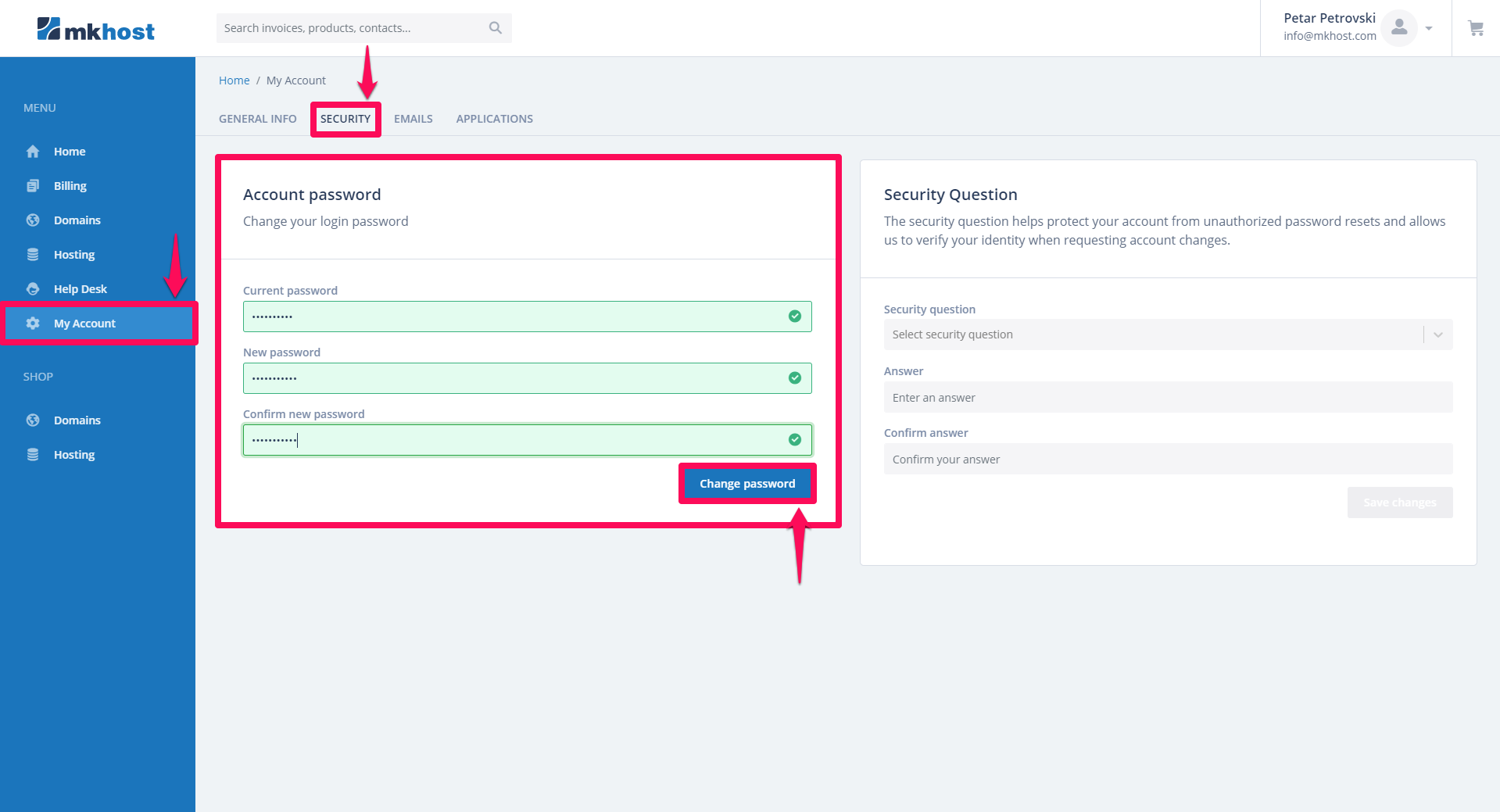
If you are already logged in tohttps://portal.mkhost.complease click onMy accountform the Menu bar, and then click on the security tab. Then enter your current password and enter and confirm your new password (the new password should contain 8 characters (letters, numbers and min 2 special characters) . In the end click onChange password