MKhost Knowledgebase
Need help? Search or browse our large collection of articles on a variety of topics including hosting, domains, emails and more .
 0Domains
How do I transfer my domain to MKhost
With the entry into force of the new MARnet regulations for the transfer and management of .mk domains (as of 11.02.2025), the transfer procedure is strictly regulated.
Anyone wishing to transfer a .mk domain – whether a legal entity or an individual – must submit a request, which can be done electronically (digitally signed), in person, or via courier service (courier service only for legal entities). This is in accordance with the Law on Electronic Documents, Electronic Identification, and Trust Services, as well as the subordinate acts arising from it.
Transfer via the MKhost portal for .mk domainsThe transfer can be made from any registrar.
For Macedonian domains (.mk, .com.mk, .org.mk, .net.mk, .inf.mk, .мкд) the transfer is free of charge.
The domain expiration date remains unchanged.
1.Login:Log in with your username and password athttps://portal.mkhost.com/login/.
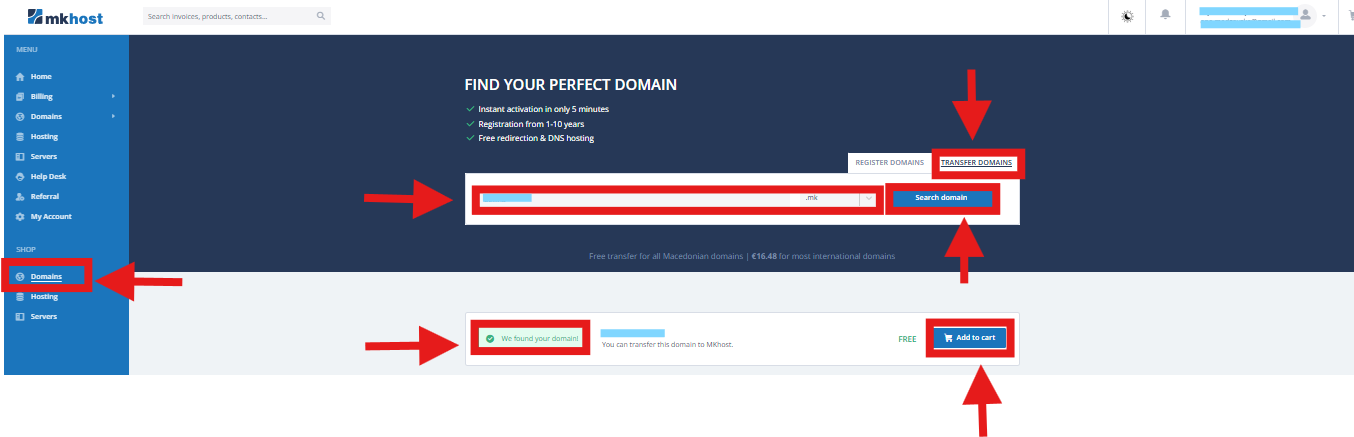
2.Transfer selection:From the menu, select Shop → Domains → Transfer Domains.
3.Domain entry:Enter the domain you wish to transfer and click Search Domain.
4.Adding to cart:When the domain appears, click Add to Cart.
5.Entering the EPP code:
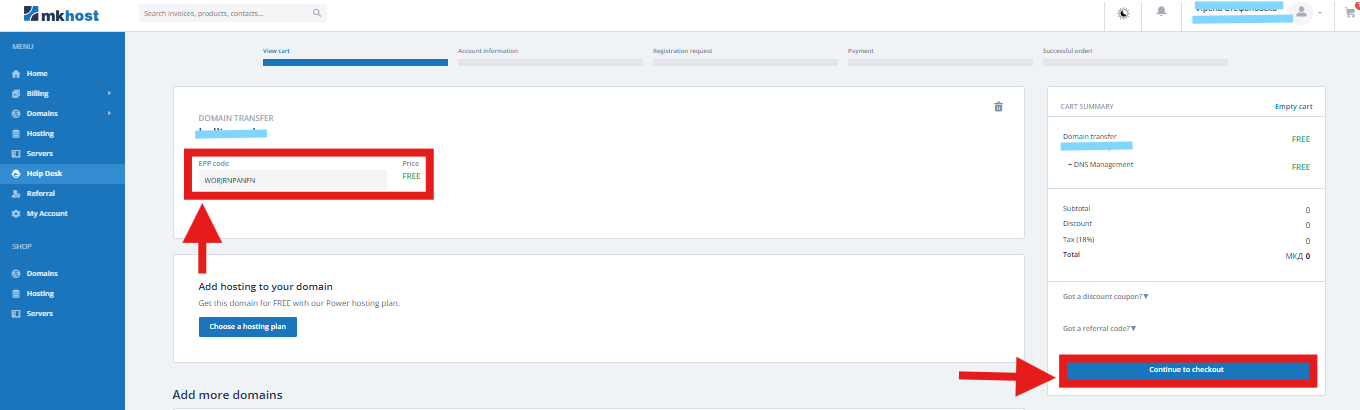
In the cart, enter the EPP code and clickProceed to Checkout.
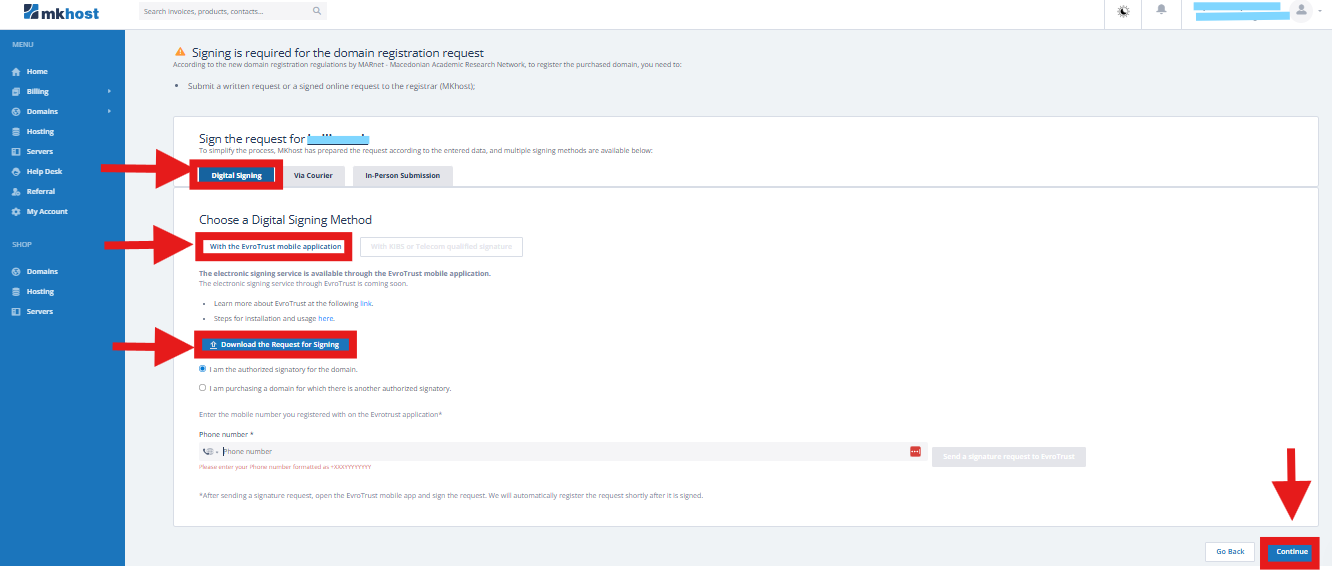
6.Signing the request:According to the new MARnet regulations, the transfer request must be signed. You can choose one of the following methods:
- Digital signing:via KIBS, Telekom, or Eurotrust.
- In-person submission:available for both individuals and legal entities.
- Courier submission (Cargo):only for legal entities.
7.Downloading the request:After selecting the signing method, download the request and clickContinue.
8.Completing the transfer:
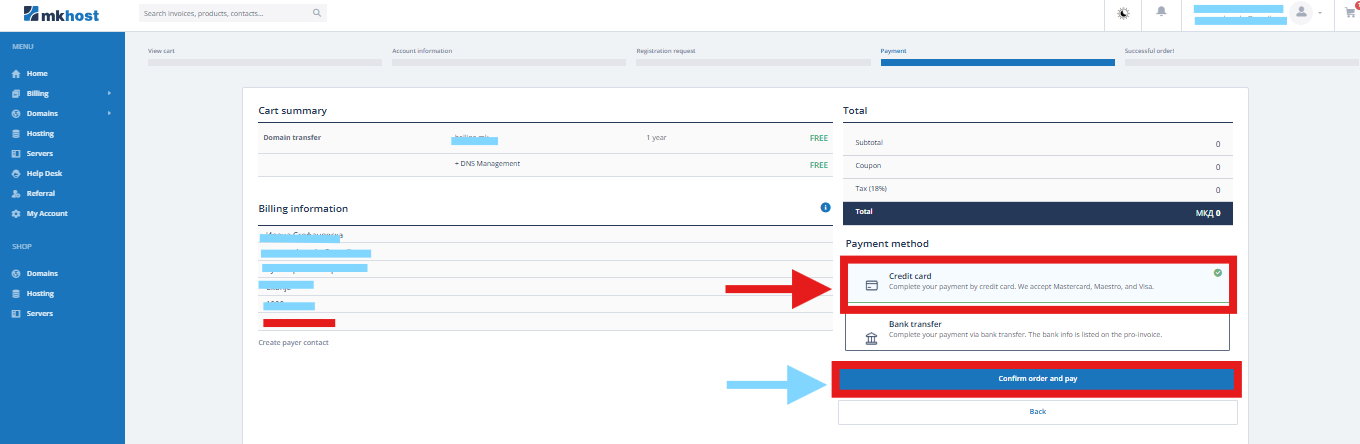
The transfer request uses the information from the previous registrar. Review the order and clickConfirm Order and Pay.
Procedure for transferring an international domain to MKhost (.com, .net, .org, .info, and others)
The transfer can be done from any registrar.
To transfer an international domain to MKhost, follow these steps:
- Unlocking the domainThe domain must have the statusUnlocked.You need to notify your current registrar or log in to their control panel and unlock the domain yourself so that it shows theUnlockedstatus.
- Obtaining the EPP/Auth CodeYou need to request the EPP code for the transfer from your current registrar.If you do not have access to the EPP code, contact your current registrar directly to obtain it.
- Confirming the transfer via emailYou must confirm the domain transfer by accessing the official email address registered for the domain. A confirmation email will be sent, which must be approved for the transfer to be completed successfully.
- Transfer durationThe transfer process usually takes 7–10 days.Until it is finalized, the domain remains with the current registrar, and you can continue managing it from there.
Important informationThe transfer must be initiated at least 10 days before the domain's expiration.
A transfer cannot be initiated for a domain that is:
- Already expired, or
- Set to expire within the next 10 days.
When transferring an international domain, renewal is automatically included.
Procedure for transferring international domains .rs and .al to MKhost
Transfer of .al domainsThe transfer can be done from any registrar.To transfer an .al domain to MKhost, follow these steps:
- Unlocking the domain (Unlock)The domain must have the statusUnlocked.Notify your current registrar or log in to their control panel and unlock the domain yourself so that it shows theUnlockedstatus.
- Obtaining the EPP/Auth CodeRequest the EPP code for the transfer from your current registrar.If you do not have access to it, contact your current registrar directly.
Transfer of .rs domainsThe transfer can be done from any registrar.To transfer an .rs domain to MKhost, follow these steps:
- Unlocking the domain (Unlock)The domain must have the statusUnlocked.Notify your current registrar or log in to their control panel and unlock the domain yourself so that it shows theUnlockedstatus.
- Obtaining the EPP/Auth CodeRequest the EPP code for the transfer from your current registrar.If you do not have access to it, contact your current registrar directly.