MKhost Knowledgebase
Need help? Search or browse our large collection of articles on a variety of topics including hosting, domains, emails and more .
Unblock IP for clients with active hosting
What is Unblock IP?
TheUnblock IPfunctionality allows clients to independently check whether their IP address is blocked and, when available, to unblock it directly through the client portal.
Blocking is most often activated as a security measure after multiple failed login attempts or after entering incorrect access credentials.
How to unblock the IP address
Log in to the MKhost client portal: https://portal.mkhost.com/login
Open theHostingsection.
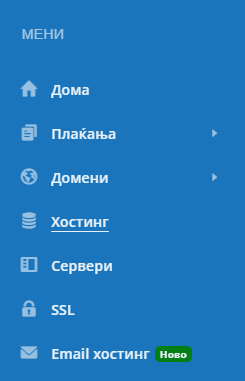
Select your hosting package.
Select theCheck IP addressoption.
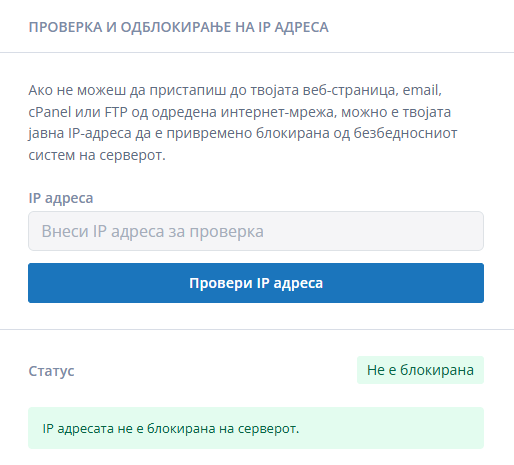
Check the displayed IP address. The system automatically displays your current public IP address.
ClickCheckor the corresponding check button.
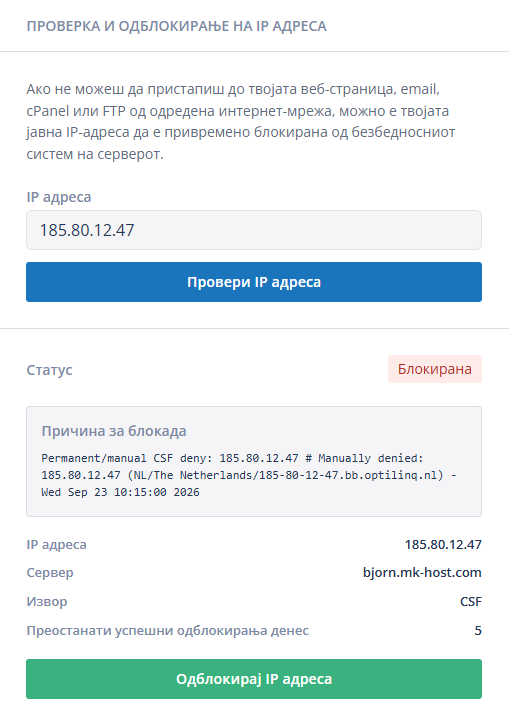
If the address is blocked, selectUnblock IP address.
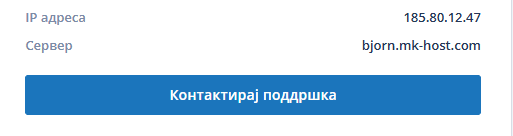
If the unblocking is unsuccessful, you will be presented with an option to contact support.
What happens after a successful unblock?
After a successful unblock, the IP address is removed from the blocklist protected by the system. Access to the services that were unavailable due to the block should be restored.
The change should take effect immediately.
Why can the IP address be blocked again?
Unblocking does not remove the cause that triggered the block. The IP address can be blocked again if failed access attempts continue.
Incorrect password for the email account.
Incorrect password or username for cPanel.
Incorrect FTP credentials saved in the FTP client.
Multiple failed login attempts.
An automatic application, script, or device attempting to access with old credentials.
A compromised account or suspicious activity from the same IP address.
If the IP address cannot be unblocked
If the option is not available, the check fails, or the IP address is blocked again immediately:
Check whether you have an active hosting package.
Check whether the IP address displayed in the portal is your current public IP address.
Correct the incorrect passwords in email, cPanel, FTP, and other applications.
Close the active sessions and repeat the check after a few minutes.
Contact MKhost technical support and send the IP address, domain, and a description of the problem.
For a faster check, in your request to support, state when the block occurred, which service is unavailable, and whether you have performed an unblock through the portal.
Most common reasons for blocking
The IP address is most often blocked automatically to prevent unauthorized access attempts. The system registers multiple failed logins from the same address and temporarily restricts access to the services. This helps protect your email accounts, websites, and hosting data from abuse.